
Search Criteria
Bricks 2.2 introduces a powerful new way to control how search results are generated, whether the search is triggered by:
- the native WordPress search (via the Search element), or
- the Filter – Search element - Query Filters feature.
With Search Criteria, you can define exactly where Bricks should search: post fields, term fields, user fields, and any custom meta fields. This gives you far more control than the default WordPress "s" search and allows fully customized search behaviour across your entire site.
Override Native WordPress Search (“s” parameter)
Section titled “Override Native WordPress Search (“s” parameter)”The native WordPress search is usually triggered through the Search element, and the results land on the Search Result template.
By default, WordPress only searches the following post fields:
- post_title
- post_content
- post_excerpt
If you want to override or extend this behaviour, the settings must be configured inside your Search Result template.
Search Criteria in the Search Result Template
Section titled “Search Criteria in the Search Result Template”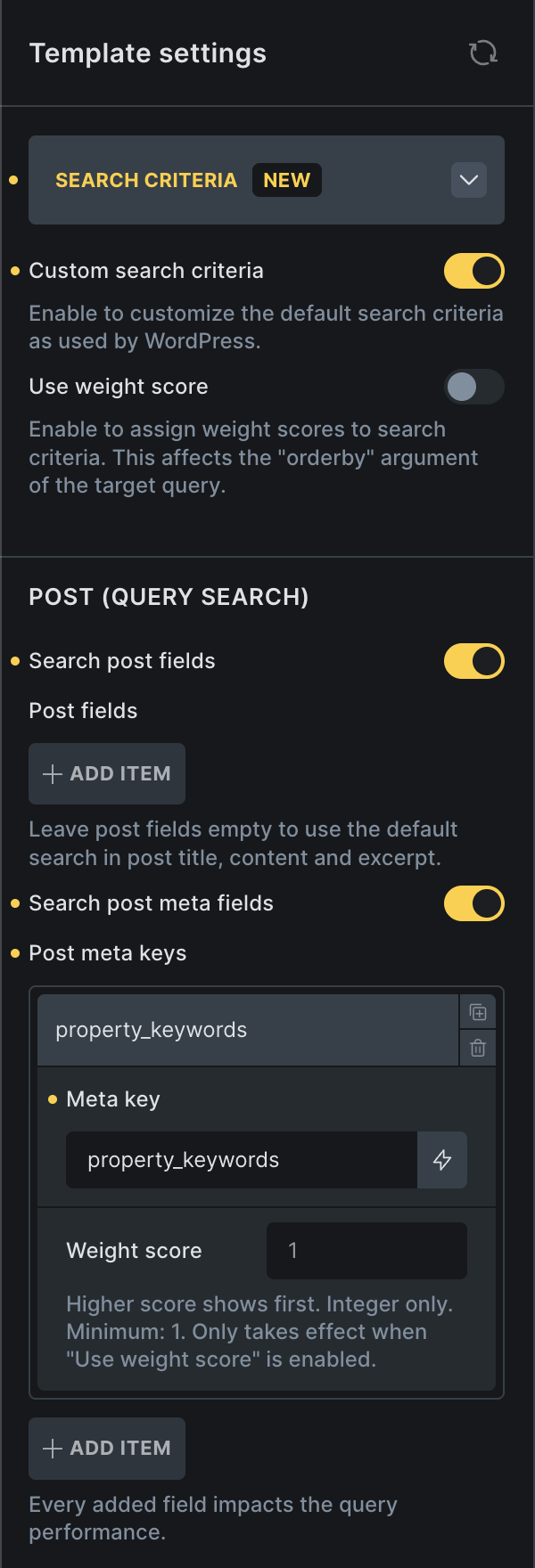
Inside the builder, open your Search Result template → Template Settings → Search Criteria section.
Custom search criteria: This reveals all available search settings for controlling how the native s search behaves.
Use weight score (optional): When enabled, Bricks will calculate a ranking score based on your defined weight values and order the results accordingly. More about weight scoring.
Search Controls (Posts)
Section titled “Search Controls (Posts)”Search post fields - Enable to define which standard WordPress post fields should be searched
Search post meta fields - You can add any meta key here (custom fields) to include them in your search criteria.
Once configured, perform a search on the frontend and your results will follow the criteria defined in the Search Result template.
Search Criteria in the “Filter – Search” Element
Section titled “Search Criteria in the “Filter – Search” Element”When Query Filters are enabled in Bricks, you can create advanced filtering systems for any Query Loop on any page.
Before Bricks 2.2, the Filter – Search element always used the default WordPress "s" logic. Now, you can define custom search criteria per filter element. Inside the Filter – Search element settings, you will now see a Search Criteria section.
Post Query
Section titled “Post Query”Search post fields - Enable to define whether to search in Title, Content, and Excerpt
Search post meta fields - You can add any meta key here (custom fields) to include them in your search criteria.
Term Query
Section titled “Term Query”Search term fields - Enable to define whether to search in Name, Slug, and Description
Search term meta fields - You can add any meta key here (custom fields) to include them in your search criteria.
User Query
Section titled “User Query”Search user fields - Enable to define whether to search in Username, Nicename, Email, URL, and Display name
Search user meta fields - You can add any meta key here (custom fields) to include them in your search criteria.
What is “Use weight score”?
Section titled “What is “Use weight score”?”Weight score lets you control the order of your search results. The higher the weight score for a specific search field, the higher the result will appear if that field matches the search term.
Example: How weight scoring works
Section titled “Example: How weight scoring works”Search Criteria setup:
Search post fields:
- Title → weight 1
- Content → weight 1
Search post meta fields:
- my_field → weight 3
Search term: “car”
Matched posts:
| Post ID | Found in | Weight |
|---|---|---|
| 1001 | Title | 1 |
| 1002 | Title + Content | 1 + 1 = 2 |
| 1003 | my_field | 3 |
Final result order: 1003, 1002, 1001